Showing posts with label send. Show all posts
Showing posts with label send. Show all posts
Sunday, May 7, 2017
How To Send 1000 Messages In Whatsapp One Click
How To Send 1000 Messages In Whatsapp One Click
How To Send 1000 Messages To A Friend In One Click
howdy friends today i am share interesting android app for you send multiple same time same message to a friend one click you send 1000 message at one using this app

Follow this step
First Download WUB Apk From here
After the download this app install the app your android phone
installed open it you can see this type of picture

now type your message to send a friend
 type your message quantity ex.. 1000
than click on send button
and send 1000 msg your friend
 enjoyed :)
thanks for visit share any one friend and ones group this post
howdy friends today i am share interesting android app for you send multiple same time same message to a friend one click you send 1000 message at one using this app
Follow this step
First Download WUB Apk From here
After the download this app install the app your android phone
installed open it you can see this type of picture
now type your message to send a friend
than click on send button
and send 1000 msg your friend
thanks for visit share any one friend and ones group this post
Available link for download

Sunday, April 30, 2017
Stock WhatsApp 2 17 2
Stock WhatsApp 2 17 2
Stock WhatsApp 2.17.2 with dynamic shortcuts and round icon (Android 7.1.1 only)
Uses the emojis installed on your device.
Install using Titanium Backup (backup with your number, uninstall WhatsApp, install this mod, restore data).


Download Link -Download Now
Available link for download
How to use someone whatsapp using your android phone
How to use someone whatsapp using your android phone
How to Use Someone’s Whatsapp In Your Android Mobile

Requirements you need to use Someone’s Whatsapp in your Android mobile
1. An android device (version 4.0+).
2. Working Internet connection.
3. Victim’s mobile.
4. Whatscan for Whatsapp web.
Steps you have to follow to use Someone’s Whatsapp in your Android mobile
So finally I step to using the account of someones WhatsAppm going to share. First of all make sure
You have all the necessary ingredients that are mentioned above.
1. So the first thing you click here and download the app to your Android phone?? whatscan pro

2. Installation is being completed, the application (Whatscan) open.
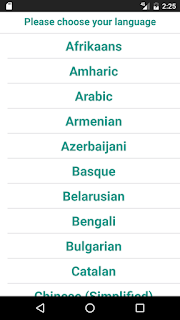
3.To select your language, select the language you would ask your convenience.
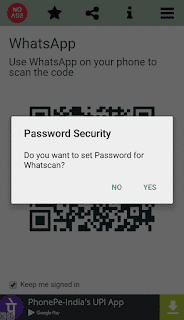
4. Then it will ask you for password protection, ie, you can turn it off if you want to lock your application.
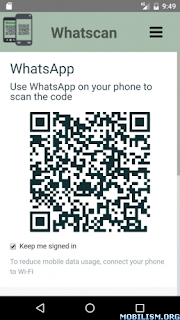
5. Then after all this, and to open the app will generate a bar code. The bar code is the plays
Important role in the entire process
6. Whatsapp Android device and take the victims open now.
7. After successfully opening the victims Whatsapp you "chat" will need to click on.
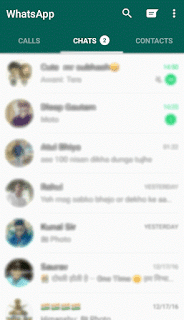
8. Then you will see three dots (vertically over one another) option in the top right of the screen,
click on that (three dots).

9. Then select ‘Whatsapp web’ option over there.
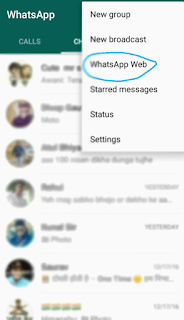
A camera will be open “ on victim’s device.
10. Now you have to scan that bar code (which was generated on your device) to that scanning
camera.
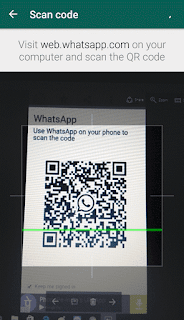
With this the whole process is being done.. But be careful friends! this bar code changes in every
510
seconds, so you have to complete all the process within 510
seconds.
Note:
1. You should not use it for crime.
2. It is temporary, not permanent.
Watch this video
Available link for download
Tuesday, April 18, 2017
Trick to Send Fake Location on Whatsapp Full Tutorial
Trick to Send Fake Location on Whatsapp Full Tutorial

How to Send Fake Location on WhatsApp
- How to Send Fake Location in Android
- How to Send Fake Location in iPhone
How to Send Fake Location to Friends in Android phone
You Android device, so you can easily step tutorials, WhatsApp step down from my device can send a fake location about how you can get more information you can use. You can easily to any person for any country easily fool your friends WhatsApp to send and free space can spot fake app. Simply follow the step by step tutorial below to find out more about it.
- First, the fake GPS of its Android app Play Store

- , About Phone, tap on build number 7 times - after that, go to your phone settings.
- And then you will get a new setting of the developer options. Reopen your phones settings, and development options of the option selected, and tick the Allow button ass place.

- Fake GPS app from your Android phone now, open up the Search button, and search for the location of your choice.
- After the search location, just click the button on the set position, and youre done.

Now open WhatsApp, and anyone sending location of the selected location, which you will send fake GPS app, enjoy it!

How to Send Fake Location on Whatsapp to Others in iPhone
You iPhone device, and you want to send the fake location of your iPhone to others, you can just follow the easy steps below now.
Note – Your iPhone Jailbreak and Cydia should be installed to use this method.
- Open CDA From your iPhone, and click the Search button and Search for Lokshanfaker s.
- There ere two Versions Available Tablet is this app I will be, so Aksording Your iOS version, select it, and then install it through the On-Screen Instructions.
- Your home screen app Lokshanfaker then, Ill U Find a new icon.
- Steblisd were open were Nuly app, and the app u Your current location and will then Choose Zoom Just Another Tablet Your Choice locations.
- The Location Negative After Selecting Your Choice, click the lower left corner, so now s the button, and You Were done. Now You Can Redke is this app.
WhatsApp and then open, and select the option to send the location. Now you fake address, which was selected in LocationFaker application will be able to send location.
Available link for download
Saturday, March 18, 2017
Whatsapp Trick How To Send WhatsApp Messages Without Internet
Whatsapp Trick How To Send WhatsApp Messages Without Internet

How to send WhatsApp messages without internet
A new message WhatsApp says the device is compatible with Wi-Fi technology and ultralight not need an Internet connection or data to run WhatsApp more.
Well, if youve read this message before, you know what youre talking about. If not, then you should know that this false message is nothing more than a cam by some malware developers.
What you can do with a group of newcomers ignorant in the world of technology? Or, finally, what can be done with a lot of new smart phone users? So, do they earn for you! It is true.

Welcome to the world of swindlers, which probably will not need a virus or malware more. All you need is a bit of clever thinking and some great words to catch those who are ignorant with the new technology.Gone are the days when a virus was designed to steal your data, but getting beyond modern encryption software and operating systems is difficult, but not impossible. And after hours of planning and development of codes that can break through the security of your smartphone, the hacker only put some junk photos and phone numbers useless therefore probably will not get on the black market. So what does he do? Simple-you click on the ads, do you make your friends click on the ads, make them do the same too and in return, earn much money from the ads themselves. No stolen data, but simple tricks to make people click on the ads.
Curiosity "always" kill the cat!
This is not a new trick hackers / scamsters book that has been used for a while, but is still more or less successful. There are hundreds of messages to inform users that they are getting some free stuff, creating a huge curiosity. This takes the user to click on the message, which takes you through a series of pages that have advertisements. Clicking on each page ad and win the hacker making money from advertising companies. Then it makes you think that the message and the website are genuine scraping the entire contents of the original page. Then click makes a series of checkboxes, enter your personal information and then pass the message to a number of friends to be eligible for the offer. Finally, to make sure you are a human and not a robot to accept the offer, but also makes downloading some applications and register those services. Once this is done, it is said that you will be able to get the offer.

n the deal, which made you click several ads and also made a copy of your personal information that you you gave. Then also it made sharing the invitation to friends (who will witness the same treatment) I think it is genuine because it came from a close "friend". Finally, also he made immediately through some pages and download some applications, which could be an advantage for him if they also contain a malware.A similar false message about enabling WhatsApp Calling was making his rounds recently. That was the moment that WhatsApp was testing the function call and you need to be invited for the voice-activated calls in your application.
Now the scene is a bit different, but the scam is similar. Many do not know what is Facebook founder announced that the basic Internet will be completely free for most people around the world. Therefore the use of the Internet for email, WhatsApp and similar service will not be charged. But the scheme has not yet seen the light of day in India. On balance Fundamentals Facebook free account planning, hackers are milking the issue. You should know that free Essentials has been banned (for now) in India as net neutrality is a strong debate that is still much controversy. Thus, free internet remains a myth in India; unless you are ripping off another data plan by using your Wi-Fi network.

On the new message WhatsApp scam, you should be careful about the recent rounds you are taking. The new scam is an invitation to a free WhatsApp messaging platform on the Internet. The invitation comes from a friend as a simple message in your WhatsApp with a link.The message comes "You can send whatsApp messages without internet" Whatsapp Launches Ultra-Light Wireless Feature to enjoy 3G Internet connection wherever you go for the WhatsApp application, Click the following link to activate. now - http://is.gd/Whatsapp-free-without-internet/

You will find the genuine message because it comes from a known source. Well, dear friend who also was deceived in the same scam and therefore the message it was.Clicking the message will take you to a website (http://whatsapp-free.easy2win.xyz) stating that the device supports ultralight Wi-Fi technology and you can get free Internet access technology after you invite 15 friends to it.The message on the page mentions that even after completing invite 15 friends you will notice that the color turns blue WhatsApp (green) when the service is activated.When you connected to the "ultra-light Wi-Fi , which is supposed to get" open with unlimited access Internet, share free media, audio-video-photo-etc, and group unlimited chat " with "real text messages time
Unfortunately, everyone who uses WhatsApp for a while knows what is free and what is not.On the page there are some social icons that should have supposed to the social pages of WhatsApp. Clicking on the icon takes you to Googles own page, and Twitter icon links to the Twitter page of WhatsApp. Facebook link takes you to a scam website that can steal your Facebook data, such as personal information, login passwords, etc. (Check the screenshot below).

WhatsApp never sent out any invitations, not held any regimes in which the Internet will be completely free. The Internet comes from your telecommunications company or Internet service provider, and certainly not for free. Unless the enterprise application attached with the service provider to provide free Internet access in your application, you will not enjoy anything for free. Not unless the issue of net neutrality is resolved.Until then, make sure you do not click anything suspicious coming from his friends in chat and email. Also make sure that you are not part of the dissemination of such information.
Available link for download
Saturday, March 4, 2017
WHATSAPP PLUS VERSION 6 30 UPDATED INVISIBLE MODE
WHATSAPP PLUS VERSION 6 30 UPDATED INVISIBLE MODE
WhatsApp Plus for Android to the updated version 6.3 0 whose main improvement is the addition of " Invisible Mode ". There are many users who are eager to try this popular unofficial mod WhatsApp, known as WhatsApp Plus, WhatsApp + WhatsApp Plus Holo or most recently asWAaplusMOD .

This new version uses as update the official version of WhatsApp Play Store, that is, to version 2.11.399. In this new version, the developer of WhatsApp Plus has included interesting improvements and many of them serve basically to leave no trace shipments of alerts and messages read messages. This function is not new, of course, but what if it is new and comes with this new version is the ability to hide the sender voice memo received has been reproduced (double blue tick), which will be very useful if we listen to the voice note, but do not want to answer the issuer immediately.

Improvements in WhatsApp Plus v6.30 :
- Base last updated the play store: 2.11.399
- NOTE: With this new base time if you hide your online status can not view the last connection of your contacts and MOD will work either 2.2.19
- New MOD 1.5 to hide issuer voice memo has been reproduced (double blue tick)
- New MOD 2.2.22 to hide archived chats panel main screen
- Group participants limit reduced to 51, it is not possible to have more servers by blockages in
- Other improvements and resolved bugs
Image via http://whatsappmessengerr.blogspot.com/
Link | Download WhatsApp Plus APK for Android v 6.30 from Mega
Link | Download WhatsApp Plus APK for Android v 6.30 from Mega

Available link for download
Subscribe to:
Posts (Atom)